Written by: Mariana Fonseca, Editorial Team, AI Growth Agent
Key Takeaways for Securing Enterprise WordPress in 2026
- 91% of new WordPress vulnerabilities in 2025 originated in plugins, with the first automated exploit arriving within five hours of disclosure. This concentration in plugins makes third-party code the primary risk for most brands.
- Standard hosting WAFs and Cloudflare block only 26% of WordPress vulnerability attacks, according to controlled pentesting, so WordPress security now depends on layered, self-healing defenses rather than a single perimeter tool.
- Ten enterprise-grade hardening steps, from automatic updates and two-factor authentication to daily offsite backups and file-permission controls, form the baseline for 2026 security.
- Static content decays in both security posture and AI visibility. Continuous schema, MCP endpoints, and narrative refresh keep your brand authoritative in AI and search.
- AI Growth Agent’s autonomous WordPress plugin converts one-time hardening into living, self-healing protection. See how it works for your brand and measure the impact on visibility and security.
The Enterprise Security Checklist for 2026
1. Enable Automatic Core, Theme, and Plugin Updates
Outdated WordPress software remains the single largest attack surface. 46% of WordPress vulnerabilities disclosed in 2025 had no patch available at the time of public disclosure, so speed of update application is non-negotiable for the 54% that do receive patches. To apply those patches the moment they ship, enable auto-updates via the WordPress dashboard under Plugins > Installed Plugins > Enable Auto-updates, or use a managed maintenance tool. For enterprise teams running multiple properties, this manual approach does not scale, so evaluate managed hosting platforms with built-in smart update managers that test compatibility before applying patches across your full portfolio.
2. Enforce Strong Credentials Plus Two-Factor Authentication
Stronger credentials and two-factor authentication shut down a large share of automated login attacks. Brute-force attempts remain a constant threat to WordPress sites, and many users still rely on weak passwords or skip two-factor authentication entirely. Enforce a minimum 16-character password generated by a password manager for every administrator and editor account. Add a time-based one-time password (TOTP) authenticator app as the second factor. Enterprise deployments should then layer in single sign-on and role-based access controls to enforce zero-trust principles across the full user base.
3. Remove Every Unused Plugin and Theme
Reducing your attack surface starts with removing code you no longer need. Deactivated plugins still contain exploitable code, so deactivation does not equal deletion. Plugins are regularly removed from the official WordPress repository, which creates permanent exposure for sites that continue to run them. Audit the full plugin list quarterly. Delete anything not actively in use, retain only one backup theme, and verify that remaining plugins show recent developer activity, a large install base, and a published security disclosure policy before keeping them.
4. Choose Secure Hosting and Enforce SSL
Secure hosting gives WordPress a hardened foundation before any plugin loads. Secure WordPress hosting should include isolated server environments, proactive threat monitoring, automatic malware scans, server-level firewalls, and 24/7 expert support. SSL certificates now count as table stakes. Most hosts provide free certificates via Let's Encrypt, and HTTPS should be enforced site-wide, including the admin area. Evaluate hosting providers on their response time to plugin vulnerability disclosures, not only on uptime SLAs, because a host that patches reactively after a breach does not function as a true security partner.
5. Limit Login Attempts and Use a Custom Login URL
Login rate limiting and a custom login URL blunt the impact of AI-powered botnets. Limiting login attempts provides one of the most direct countermeasures against the automated traffic now dominating WordPress attack logs. Brute-force attacks increased significantly in 2025, bypassing traditional CAPTCHA and mimicking human login patterns. Plugins such as Limit Login Attempts Reloaded restrict failed attempts to three to five tries before temporarily blocking the IP. Pair this with a custom login URL, replacing the default /wp-login.php path, to remove the standard target that automated scanners probe first. Add CAPTCHA as a third layer for any login page that remains publicly accessible.
6. Schedule Daily Offsite Backups
Reliable offsite backups turn a worst-case breach into a recoverable incident. Backups must be offsite, automated, redundant, and regularly tested, not simply scheduled and forgotten. A backup stored on the same server as the compromised site becomes inaccessible during a breach. Real-time backup solutions that create a new snapshot every time content or files change provide the tightest recovery window. For enterprise properties publishing content daily, a 24-hour backup gap represents a full day of living content that cannot be recovered without a rebuild.
7. Apply WordPress File Permissions Best Practices
Correct file permissions block many malware injection attempts before they start. WordPress recommends setting directories to 755 and files to 644, with wp-config.php restricted to 400 or 440 and protected via .htaccess deny rules. These settings prevent web processes from writing files arbitrarily and close a primary vector for malware injection. Wordfence has documented malware on sites running fully up-to-date software where improper file permissions were the entry point, which confirms that updates alone are insufficient. Add Options -Indexes to the root .htaccess file to disable directory browsing and prevent attackers from enumerating plugin and theme structures.
8. Disable File Editing in the Dashboard
Disabling file editing in the dashboard removes a common post-compromise escalation path. The built-in WordPress theme and plugin editor gives any compromised administrator account direct code execution capability. Disable it with a single line added to wp-config.php:
define('DISALLOW_FILE_EDIT', true);
This step, combined with moving wp-config.php outside the web root and applying .htaccess rules to block PHP execution in the uploads directory, removes the most common post-compromise escalation paths. For enterprise teams, version-control this change and apply it across every environment, including staging, development, and production, not only the live site.
9. Deploy a Security Plugin Plus WAF
A security plugin and WAF work together to inspect and filter traffic before it reaches WordPress. A WAF filters and monitors HTTP traffic between the application and the internet, blocking cross-site scripting, SQL injection, CSRF, and file inclusion attacks before they reach WordPress. Cloud-based WAFs deploy via a DNS change and receive continuous rule updates without manual maintenance. Recommended options include Wordfence for on-server WAF and malware scanning, Sucuri for cloud WAF and post-hack cleanup, and MalCare for one-click automated malware removal. A WAF does not replace the hardening steps above. It functions as the filter that catches what slips through. As noted earlier, even the best WAF configurations have significant limitations, which is why the layered defense approach outlined in steps 1 through 8 remains mandatory.
10. Turn Static Content into Living, Self-Healing Protection
Content security and AI visibility now depend on continuous refresh, not one-time publishing. Every step above addresses the infrastructure layer, but none of them address the content layer, where enterprise WordPress sites lose both security posture and AI visibility at the same time. Static content that never changes becomes a liability. It drifts from current brand positioning, loses citation authority in AI surfaces, and accumulates technical debt in schema, sitemaps, and robots.txt that no one maintains.
AI Growth Agent's WordPress plugin closes this gap by turning content into a managed, living asset. It deploys bot traffic tracking, Blog MCP and Web MCP endpoints, advanced robots.txt, a proper sitemap.xml, and full schema coverage, including article, FAQ, local business, organization, review, product, and author, automatically out of the box. No technical configuration is required from the brand's side. The plugin connects to AI Growth Agent's autonomous content engine, which continuously refreshes every published article so that living content does not decay and the brand's narrative stays current across every AI surface reading the site. When a rule, CTA, or link changes, the engine syncs and updates affected live articles overnight without republishing effort.

This content layer converts a hardened WordPress installation into incremental visibility. Bot traffic tracking surfaces exactly which crawlers, including GPTBot and Google's AI agents, hit the site and cite its content. Schema and MCP endpoints ensure those agents can read and trust what they find. Continuous content refresh ensures the next training sweep finds the brand's current narrative, not a stale version from months ago.
Decisions Non-Technical Leaders Need to Make
Non-technical leaders now decide on security engines, not individual tools. The ten steps above do not represent a one-time project. 11,334 new vulnerabilities were discovered in the WordPress ecosystem in 2025, which averages more than 30 per day. A checklist completed in January becomes partially obsolete by February. The decision a CMO or business operator needs to make does not center on which individual tools to buy. It centers on whether to own a single engine that handles updates, authentication, backups, permissions, WAF, and continuous schema, MCP endpoint, robots.txt, and sitemap refresh, or to stitch together a stack of agencies and point tools that each cover one layer and leave the gaps between them unmanaged.
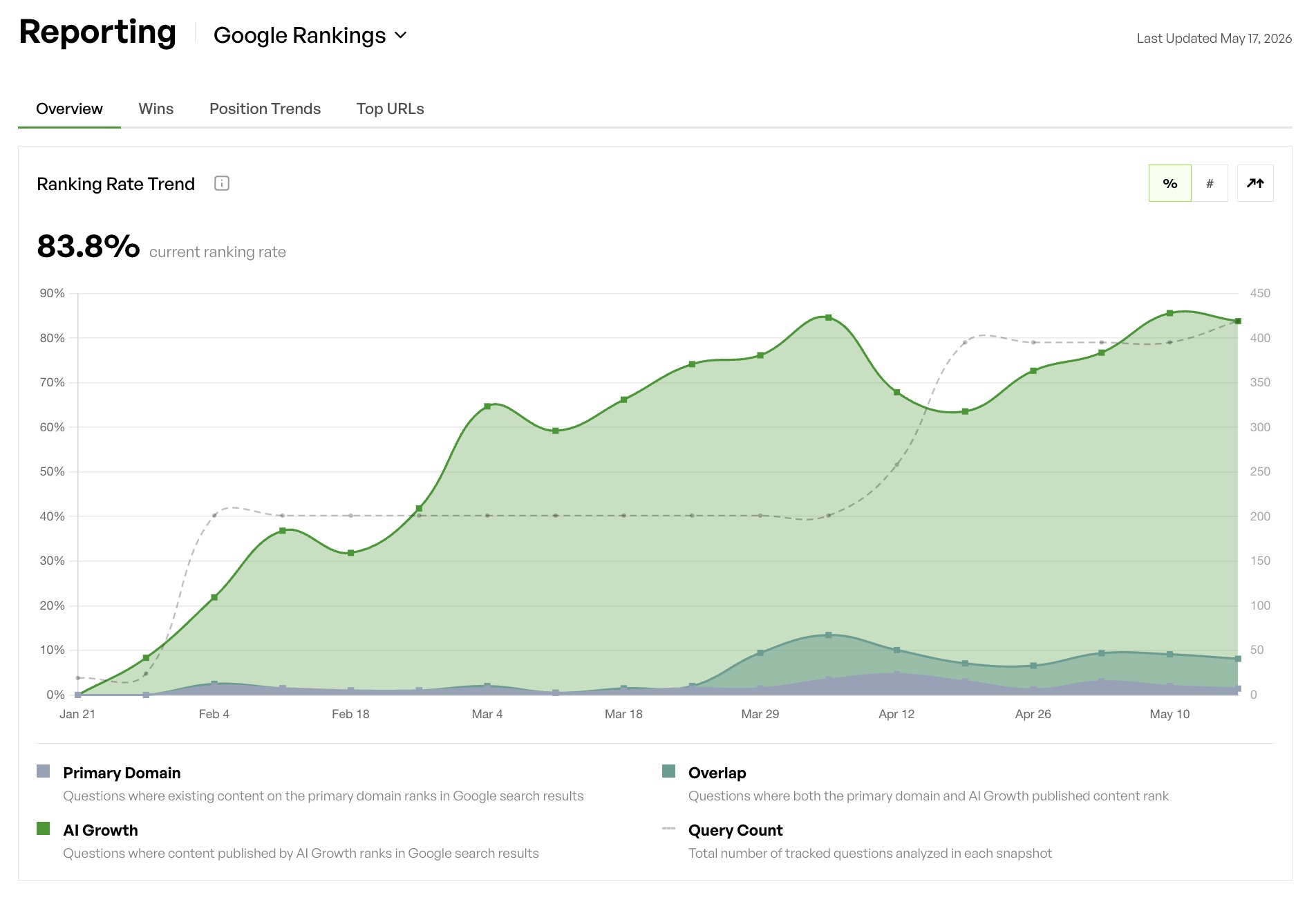
AI Growth Agent functions as that single engine. It replaces the agency dependency, removes the technical headcount requirement, and delivers proof of incremental visibility week over week through its proprietary dashboard, Google Search Console impressions, and bot traffic data from the WordPress plugin. Security compounds instead of eroding. Content authority compounds instead of decaying. The brand's narrative stays current across every AI surface that reads it.
Frequently Asked Questions
How often should WordPress backups run?
Enterprise WordPress sites that publish content regularly should run daily automated offsite backups at a minimum. Sites that publish multiple articles per day benefit from real-time or change-triggered backups that create a new snapshot every time content or files are modified. The backup must be stored offsite, on a separate server or cloud storage account, because a backup on the same server as a compromised site becomes inaccessible during an active breach. Teams should also test backups periodically by running an actual restore to confirm the files are intact and the process works under pressure.
Does a security plugin replace good hosting?
A security plugin does not replace secure hosting, and both layers are required. A security plugin and a WAF operate at the application layer and catch threats that reach the WordPress installation. Secure hosting operates at the server and network layer, providing isolated environments, DDoS mitigation, server-level firewalls, and proactive patch management before a threat reaches the application. The two layers work in a complementary way, not an interchangeable one. A strong security plugin on a poorly configured shared host still leaves the site exposed to server-level attacks and cross-site contamination from neighboring installations, so enterprise sites need both layers in parallel.
How quickly do attackers exploit new WordPress vulnerabilities?
Attackers now exploit new WordPress vulnerabilities within hours, not days. The median time to first exploit for WordPress vulnerabilities is five hours after public disclosure. Approximately 28–32% of CVEs or known exploited vulnerabilities are exploited within 24 hours of disclosure. Many WordPress site administrators still take days to apply a critical patch, which leaves the site exposed to automated mass-scale attacks during that window. Automatic updates, a WAF with virtual patching capability, and a security plugin with real-time threat intelligence now form necessary components of a 2026 security posture. Waiting for a scheduled maintenance window no longer works as a viable strategy.
Can the AI Growth Agent plugin automate schema and MCP endpoints?
The AI Growth Agent WordPress plugin automates schema and MCP endpoints as part of its standard deployment. It applies full schema coverage, including article, FAQ, local business, organization, review, product, author, and software application schema, automatically during installation. It also provisions Blog MCP and Web MCP endpoints, advanced robots.txt, and a proper sitemap.xml out of the box. These structures give AI surfaces and training agents what they need to read, trust, and cite a site's content. No manual configuration or technical expertise is required from the brand. The plugin connects directly to AI Growth Agent's autonomous content engine, so schema and endpoints stay current as content is refreshed and the brand's positioning evolves.
What happens when content is not refreshed?
Unrefreshed content loses both security relevance and visibility over time. On the security dimension, outdated articles may reference deprecated plugins, old configurations, or superseded practices that create misleading guidance and erode trust. On the visibility dimension, AI models and search crawlers weight recency and accuracy when deciding what to cite. A site whose content was last updated months ago signals lower authority than one whose articles are continuously refreshed. For enterprise brands, this decay translates directly into lost citations in AI Overviews, ChatGPT, and organic search, and into a narrative that drifts away from current positioning without anyone noticing until the damage becomes measurable.
AI Growth Agent Turns Hardening into Compounding Visibility
Continuous automation across security and content now separates resilient brands from vulnerable ones. One-time hardening fails because the threat landscape moves faster than any static checklist. The brands that win in 2026 run a single engine that automates every layer, including updates, authentication, permissions, WAF, schema, MCP endpoints, robots.txt, sitemaps, and continuous content refresh, so security and visibility compound together instead of eroding in parallel. That engine already exists and can go live in as little as one week.